
Android Tip: Hide the On Screen Buttons (Immersive Mode) without Rooting your Phone.


Android's Chrome Web Browser in "Immersive Mode" on my Nexus 7.
Since their introduction in Android 4.0 "Ice Cream Sandwich", on screen buttons are a dividing point among many Android enthusiasts.   The pro's usually mean less bezel on your device, less hardware that could go bad, and button standardization.   The con is a very simple one.  It eats into your available screen space, making your screen seem smaller than it really is, and getting in the way of your content.

Android's Chrome Web Browser in normal view on my Nexus 7.

In reading and web browsing, they really do take up a lot of screen space, especially when you add things like tabs, the status bar, etc.  With the release of Android 4.4 "Kit Kat", Google attempted to remedy this issue with the release of "Immersive Mode" for Android.  What this mode does is hide all elements from your screen, EXCEPT for your content.  This means a lot more room to read, game, watch videos, etc.  With a downward swipe of your finger, you can make your buttons and status bar reappear temporarily while you're in your app.  The problem is that this mode has to be "activated" by the app developer, and even Google themselves have not implemented it in all of their apps.  To this day, the Chrome web browser (pictured above in standard mode and in the main picture (immersive mode) for this article), still does not have immersive mode turned on for some mysterious reason.   Neither do Google music, Hangouts (unless viewing a picture), Google+, Gmail, Google Voice (which is WAY overdue for a overhaul), etc.
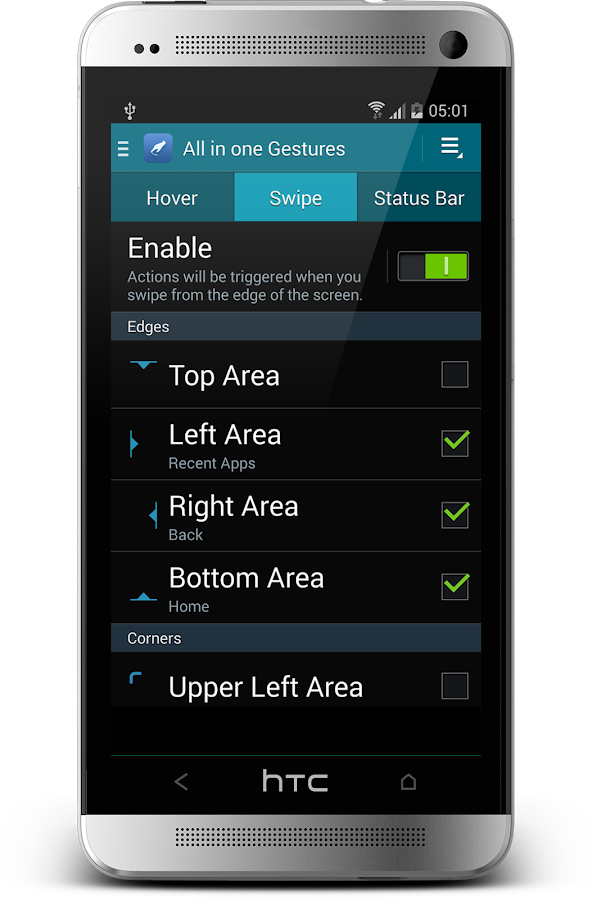
All in One Gestures has a large number of options, and is very customizable.
Enter "All in One Gestures", by developer Phoenix Studios.  Without having to root your device, you can use this free app to force immersive mode in any app by using gestures.  In most apps that I used, this worked very well.  Pulse News Reader for example is so much more enjoyable with this mode turned on.  Classic gaming on Retroarch is so much better, there is more screen in Adobe Photoshop Touch, etc.  Web browsing with Chrome is a lot more enjoyable.   There is a catch with Chrome (and web browsing) however.  When in "immersive mode", you cannot use the on screen keyboard.  You can simply use a gesture to turn the mode off and type what you need, then reactivate, or use a bluetooth keyboard,  so it should not be a huge issue for most.

The App is free, with ads, and no in app purchases.

If you like this page, or any of my articles, please feel free to click on an ad when visiting.  It helps keep the blog going.  If that sounds like too much work, then please follow, subscribe, comment, and share the blog with your friends! I love visitors!

Comments

  1. This is one of the most informative Android app guides I've come across recently. The feature tables and app comparison make it much easier to understand which app fits different needs. If anyone is searching for official download pages and updated installation guides, I also recommend YouCine APK, TeaTV APK, and Remini APK.

    ReplyDelete

Post a Comment

Popular posts from this blog

Drastic - The Nintendo DS emulator for Android

Phoenix Wright on the 3DS on the left and Nexus 5 on the right In the last decade, the power that has become available to mobile devices has grown at an amazing pace.  Games that were once only available on high end arcade systems or the latest consoles are now playable on devices that fit in your pocket.  Loading up games like Need for Speed, Horn, Shadowgun, Final Fantasy, or even Grand Theft Auto show that mobile gaming has come a long way in a short time. Enter the Nintendo DS, a dual screened mobile system that was released in November 2004 that rendered 3D games and featured a resistive touch screen as well as an impressive game library.  Surely, such a recent system should be difficult to emulate on mobile phones, right?  With Drastic, the NDS emulator on android, the answer is "NO." Drastic is a full speed Nintendo DS emulator that is currently priced at $5.99 on the Google Play store.   There is also a free demo that allows gaming sessions for 3...

Final Fantasy III Android Updated: Now with Cloud saves and Controller Support

Lifesperience is now Raycommend, which can be found here:    Ray Commend   Like the headline says, Square Enix finally updated Final Fantasy 3 with Cloud Saves, as well as support for many physical controllers.  After booting up the updated game on my Nexus 5, I was greeted with the new and very blue cloud save icon on the top right of my screen. In case that you missed it, the cloud save icon is on the top right of the screen. I started a new game and played just enough to defeat the first boss of the game, and once in the overworld, I saved my file and tested the cloud save system.  Afterwards, I quit my game, and logged onto my Nexus 7. The cloud save menu is simple but functional Once the game booted up on my Nexus 7, I once again pressed the Cloud Save icon and was able to continue from my save file.   The interesting thing about this system is that it does not use Google Play games.  It will instead upload to your Google drive ...

Retron 5 hacked to launch RetroArch and play ROMS off your SD card

It appears that a someone going by the screenname of  RetroN Labo  on Youtube has successfully hacked the Retron 5 console to run the full version of  Retroarch.  In the video shown, various emulators that are not part of the original firmware are playable including the PC Engine, Playstation One, Nintendo DS, and Wonderswan.  As the stock firmware from the Retron 5 is programmed to load games from an original cartridge when it is inserted, this hack appears to run ROM and ISO files, most likely from the SD card slot built into the back of the console. In most of instances shown in the video, emulation appeared to run smooth, and the games previewed looked playable. Currently, Hyperkin (Retron 5 manufacturer) is in hot water with Retroarch's creators due to using their emulator cores without permission.  After being discovered, Hyperkin has shared their code, and claims that they have removed any infringing code from their console. ...